Hoppscotch Versioned Entities
Introduction
Hoppscotch is a popular (70,000+ stars on GitHub) tool for testing and interacting with Application Programming Interface (API). Developers use Hoppscotch to send Hypertext Transfer Protocol (HTTP) requests like POST, GET, PUT, DELETE, etc., and see how they respond in real-time. The tool is fast, lightweight, and easy to use. It supports other features such as WebSocket for real-time two-way communication between a client and a server, Server-Sent Events for updates from servers, MQTT for publish/subscribe messaging, and GraphQL for querying APIs. Additionally, Hoppscotch also has security features like using tokens and OAuth. Overall, Hoppscotch provides a platform for developers to interact with APIs easily.
Tech Stack
Hoppscotch uses Vue.js on the frontend, Nest.js on the backend, PostgreSQL for the database, and Docker to ensure the application runs consistently across different environments.
| Layer | Technology | Description |
|---|---|---|
| Frontend | Vue.js | JavaScript framework for building user interfaces. |
| Backend | Nest.js | A TypeScript-based Node.js framework for building scalable and maintainable server-side applications. |
| TypeScript | Type superset of JavaScript, ensuring type safety and better maintainability. | |
| Database | PostgreSQL | An open-source relational database for storing structured application data. |
| Docker | A containerization tool to ensure that database and application dependencies run consistently across environments. |
Exploring the Issue
The issue addressed that the "settings" part of the project needs to be updated to validate and update an old version of settings data to match the latest version. In addition, the "history" section needs to be integrated with versioned entities. In summary, we need to implement the versioned entities for the settings functionality and integrate the versioned entities to track historical changes.
First, we need to understand some technical jargon. What does "versioned entities" mean? In a system, data structures or objects have version numbers. These version numbers let developers keep track of the history of updates and create multiple versions of the same data. This helps manage settings or data that change but still need old versions. What about "schema"? The word "schema" means shape in Greek. In databases, we can understand "schema" as the shape of the data or how data is organized. Hoppscotch uses Zod to define and check data types, known as Zod schema. Zod is a TypeScript library that is designed to eliminate repeated type declarations. You only define the type once, and Zod creates the TypeScript type. In addition, simple types can be combined to create more complex data structures.
Back to the issue, the concept of versioned entities was introduced to validate and manage incoming data structures that are stored in localStorage. Versioning ensures that the data matches with the latest schema while supporting migrations from the older version. Each entity version is mapped to its corresponding schema by using verzod library. safeParse method validates and migrates data. If it successfully validates data, the safeParse method converts data to the latest version; otherwise, the data is flagged for errors.
Each versioned entity has its schema versions defined under the @hoppscotch/data package. The createVersionedEntity function initializes these entities by supplying their latest version, a map of schema versions, and a getVersion method. The getVersion method checks the version of incoming data based on its structure. It checks against the versionedObject schema, defined as an object with a v property that stores a number as a value. If this check succeeds, it returns the v value –a version number. If the check fails, it parses the data with V0_VERSION schema. It returns 0 if successful, or null otherwise.
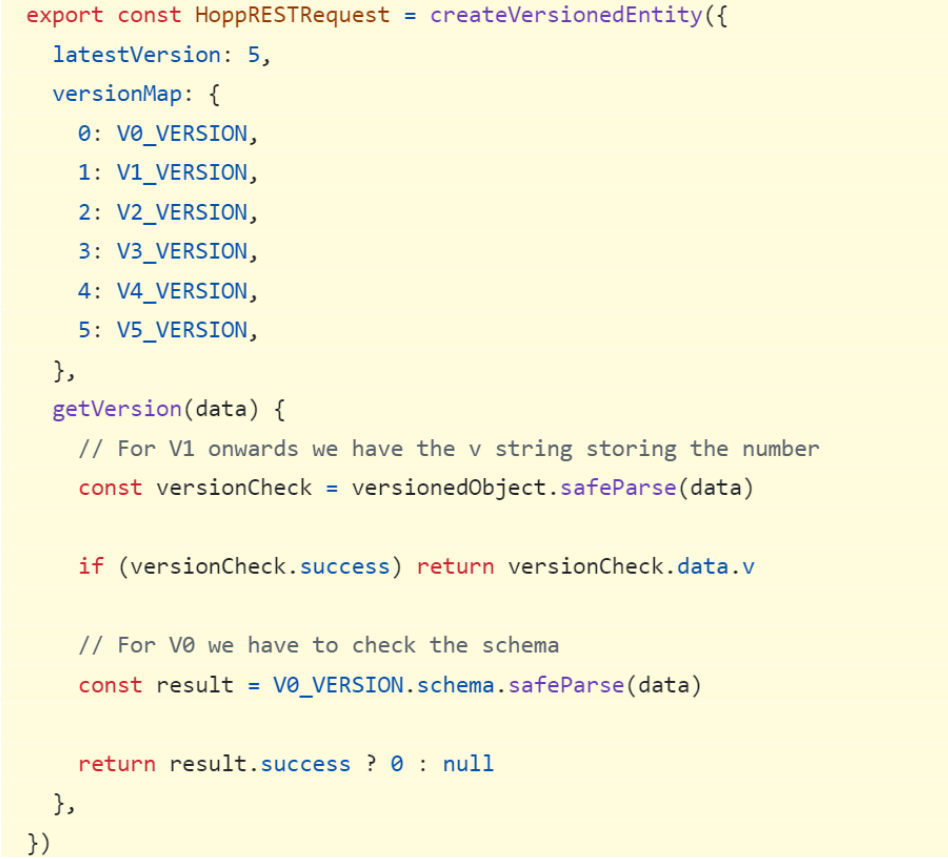
Creating versioned entity for HoppRESTRequest
Implementation
After understanding the issue and reviewing examples of existing versioned entities such as HoppCollection, HoppGQLRequest, HoppRESTRequest, Environment, and GlobalEnvironment, Settings and History were implemented similarly. A settings directory was created within packages/hoppscotch-data/src to organize related functionality. Similarly, a history directory was created under packages/hoppscotch-data/src, with nested directories for rest and graphql. For each directory, a v subdirectory was created to define and organize version-specific schema. In the v directory, versioned schema files like 0.ts are implemented to define data objects and validate their structure. In addition, index.ts was created to validate data against the appropriate schema version and create a versioned entity.
Below are the expected settings schema that would be defined in 0.ts with additional properties like v and ENABLE_AI_EXPERIMENTS.
export const settingsSchema = z.object({
  v: z.number(),
  ENABLE_AI_EXPERIMENTS: z.boolean(),
  // ... other properties
})
Note: The ENABLE_AI_EXPERIMENTS property was identified during an inspection of the application by navigating to Storage → Local Storage → settings.
The index.ts files for settings and history were implemented similarly to HoppRESTRequest that I explained above.
After implementing the Settings and History modules, the PersistenceService class in packages/hoppscotch-common/src/services/persistence/index.ts was updated to be compatible with the new implementations. These changes replaced the previous schema validation logic with the new versioned entities (Settings, HoppRESTHistory, and HoppGQLHistory) for improved data validation and structure.
Challenges
One of the challenges was to set up the project. During setup, I encountered a database connection error: PrismaClientInitializationError: Can't reach database server at. After researching, I found a solution on Stack Overflow. The issue was that the database URL needed my IP address instead of the container name. The database URL has to be written in this format:
postgresql://<USER>:<PASSWORD>@<HOST>:<PORT>/<DATABASE>
The <HOST> is my local IP address. After I fixed this issue and set the environment variables for the project, I successfully ran the application.
Another challenge was to understand the issue. As I explained above, after understanding technical jargon and what the issue asked for, it greatly much easier to solve it.
Conclusion
Implementing versioned entities in Hoppscotch for the settings and history modules was a rewarding experience that deepened my understanding of schema validation, data versioning, and migration strategies. By leveraging the verzod library and the createVersionedEntity pattern, I ensured that old and new data structures were consistently validated and updated. You can check out the pull request for this issue.
What I Learned
-
Versioned Entities: Version numbers enable tracking data evolution over time, allowing systems to support both legacy and current data structures simultaneously.
-
Schema Validation with Zod: TypeScript-first schema validation eliminates redundant type declarations and ensures type safety across the application.
-
Data Migration Strategies: The verzod library's safeParse method automatically validates and migrates data from older versions to the latest schema.
-
Consistent Architecture: Following established patterns like HoppRESTRequest made implementing new versioned entities more straightforward and maintainable.
-
Debugging Skills: Troubleshooting the database connection issue reinforced the importance of understanding network configurations in containerized environments.