Debugging a React Native Component Layering Bug
March 6, 2026
While building a mobile app, I ran into a component layering problem in React Native.
Here's the story of how I debugged it.
The App I'm Building
I'm currently building a mobile app called Stove Off.
The idea is simple: people with anxiety often wonder things like:
"Did I turn off the stove?"
"Did I lock the door?"
"Did I close the windows?"
The app lets users create a checklist before leaving home. They can optionally take photos as proof, and the app logs a timestamped entry. To protect privacy, photos are stored only on the device and logs automatically delete after 48 hours.
Technically, the app uses:
- Expo / React Native
- Supabase for anonymous authentication and database
While wiring up the database layer, I created a test screen with two buttons:
- Run DB Test
- Reset Session (Sign Out)
The first button ran a test script that signed in anonymously, created a template, inserted checklist items, created a run entry, and logged completion.
The Problem
The Run DB Test button simply did nothing. No errors.
Then, I added console.log in the TestScreen component, and the two buttons.
console.log('TestScreen mounted')
<Button
  title="Run DB Test"
  onPress={async () => {
    console.log('Run DB Test button pressed')
    try {
      await runStoveOffDbTest();
      console.log("DB test finished");
    } catch (e) {
      console.error("DB test error:", e);
    }
  }}
/>
<Button
  title="Reset Session (Sign Out)"
  onPress={async () => {
    console.log('Sign out button pressed')
    await supabase.auth.signOut()
  }}
/>
When I refreshed the page, the console output looked like this:
LOG TestScreen mountedBut when I clicked on Run DB Test, nothing happened, no logs.
I played around and clicked on the Reset Session (Sign Out) button.
Console output:
LOG Sign out button pressedWhat made this confusing was that the Reset Session (Sign Out) button worked perfectly. So:
- the screen was rendering
- the sign out button worked
- logs were working
But the Run DB Test button didn't work. Interesting...
My First Assumption (Wrong)
Since the button triggered a Supabase test function, my first assumption was that something was wrong with the backend.
The Real Problem: Component Layering
But since the sign out button worked, the problem wasn't the database. The function was never being called.
After I googled the problem, the issue turned out to be component layering.
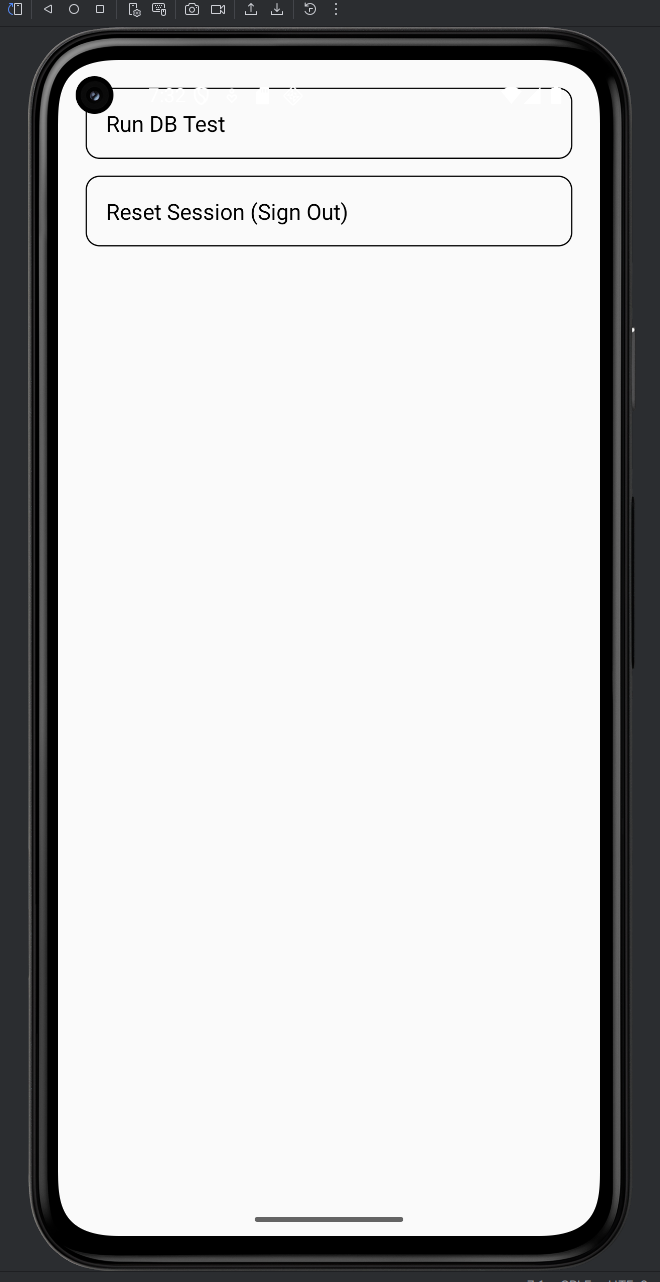
My original layout looked like this:
<View style={{ padding: 20 }}>
Because the padding was small, the top button was partially covered by another layout layer (likely related to the header or safe area). Visually, the button looked clickable, but touch events were intercepted by the overlapping layer.
The Fix
The fix was simple. I changed the layout to include extra top padding, so the button wasn't near the overlapping region:
<View style={{ padding: 20, paddingTop: 80 }}>
I also switched to Pressable for clearer touch handling:
<Pressable
  onPress={() => {
    console.log('Run DB Test button pressed')
  }}
></Pressable>
After that, the logs appeared instantly:
LOG  Run DB Test button pressed
LOG  DB TEST STARTED
LOG  Signed in anonymously
LOG  Template created
LOG  Run started
LOG  Test completed
Everything worked. The database logic was fine all along.
What I Learned
1. UI bugs can look like backend bugs
Because the button triggered database logic, I immediately suspected Supabase. But the problem was actually in the UI layer.
2. Always confirm the event handler runs
Before debugging deeper logic, verify that the event handler function is actually called by using console.log.
3. Visual appearance doesn't guarantee touchability
In React Native, a component may look clickable but still be covered by another layer. Touch events follow the layout hierarchy, not what the UI visually suggests.
4. Layout issues are common near headers and safe areas
Components near the top of the screen can sometimes be overlapped by navigation headers, safe area adjustments, or parent containers. Adding padding or restructuring layout can fix it quickly.